下午有时间,详细研究了一下uni-app小程序自定义ToolBar,胶囊 💊 如何适配 …
uni.getWindowInfo().statusBarHeight仔细看,获取状态栏的高度这个方法,和胶囊之间是有一定距离的
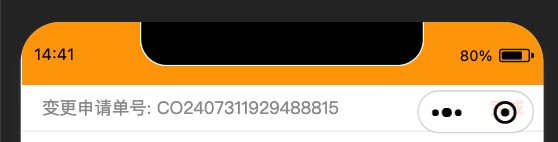
然后,uni.getMenuButtonBoundingClientRect(),他.height是不是包含了刚才那块空白呢,仔细看,实际上是没有 …
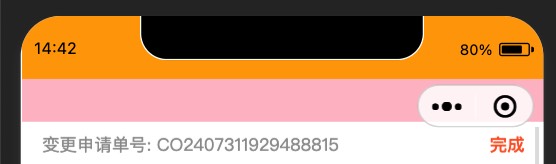
所以,你想适配胶囊 💊 的高度,中间的间隙是要自己算出来的,
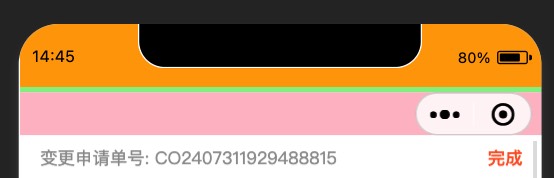
胶囊💊.top - 状态栏高度
那么可以反推uni-app自带的标题栏的高度是,两个空隙 + 胶囊💊的高度 …
let capsule = uni.getMenuButtonBoundingClientRect();
let statusBar = uni.getWindowInfo().statusBarHeight;
console.log("ToolBar: ", 2 * (capsule.top - statusBar) + capsule.height);
|
最后结论是40px,没有特殊需求,就默认高度40就完了,有特殊的需求,自己去算吧 …
这个他奶奶的果然不能写死40px,在模拟器上面打印出来40px,在真机iPhone12 Pro上面打印出来是44px …
为了以后方便使用,这里封装成了Hook,
import { onMounted, ref } from "vue";
export const useUniSafeArea = () => {
const toolBarHeight = ref(0);
const statusBarHeight = ref(0);
const capsuleHeight = ref(0);
const capsuleWidth = ref(0);
const screenHeight = ref(0);
onMounted(() => {
const capsule = uni.getMenuButtonBoundingClientRect();
capsuleHeight.value = capsule.height;
capsuleWidth.value = capsule.width;
statusBarHeight.value = uni.getSystemInfoSync().statusBarHeight || 0;
toolBarHeight.value =
(capsule.top - statusBarHeight.value) * 2 + capsule.height;
screenHeight.value = uni.getSystemInfoSync().screenHeight || 0;
});
return {
toolBarHeight,
statusBarHeight,
capsuleHeight,
capsuleWidth,
screenHeight,
};
};
|